
Duplicating Products
Duplicating a product allows you to create a new product based on an existing one, with all relevant data pre-filled for review. This is useful when you want to reuse product information while making independent changes that should not be affected by supplier updates.
How to duplicate a product
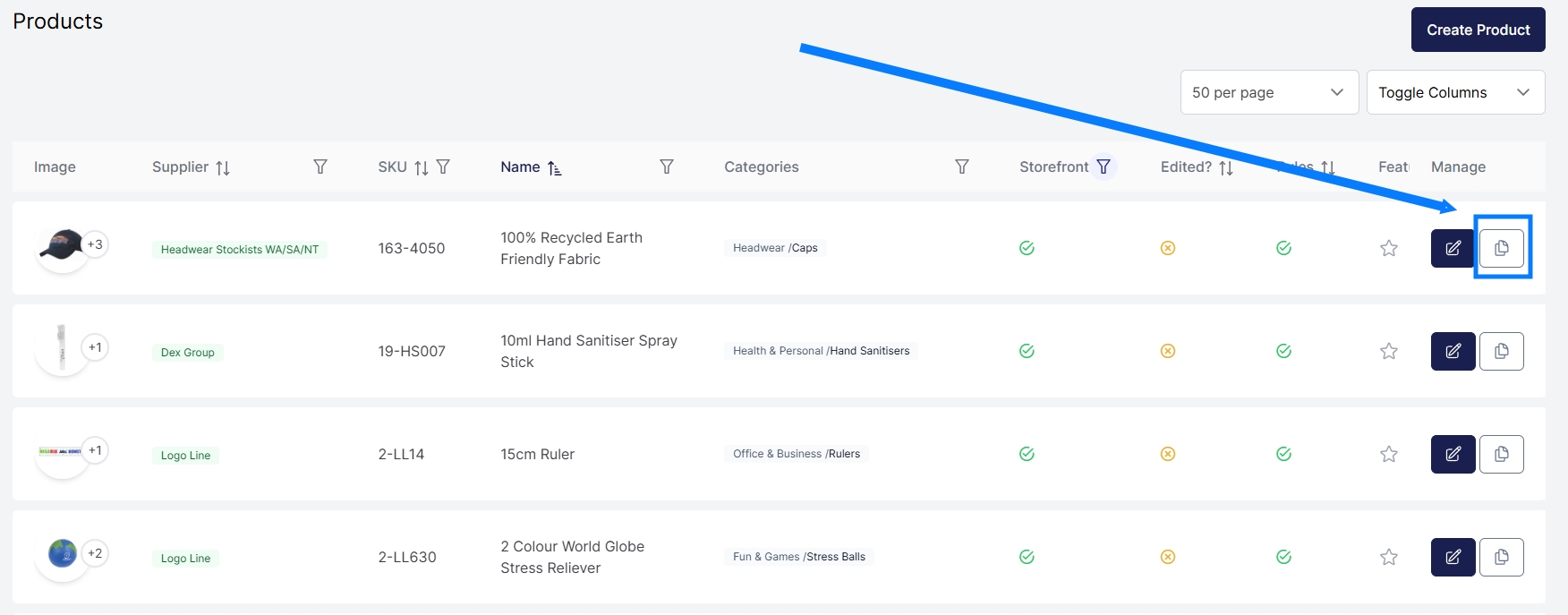
- Go to the Products page.
- Locate the product you want to duplicate.
- Click the Duplicate button for that product.
- A new page will open with all product data duplicated and pre-filled.
- Review and update the details as required.
- Click Create at the bottom of the page to create the new product.
Once created, the new product will appear as a separate product in the system.
What data is duplicated
When duplicating a product, the system copies all relevant product data, including (but not limited to):
- Product details
- Pricing
- Images
- Custom fields
- Storefront settings
- Any other associated entities
This allows you to start from an existing configuration rather than creating a product from scratch.
Important considerations when duplicating supplier products
If the original product is sourced from a supplier feed (for example, via Promodata or another data feed), it is important to understand the impact of duplication.
Once duplicated:
- The new product is no longer linked to the supplier feed
- Pricing, images, custom fields, and other data will not be automatically updated when the supplier updates the original product
- The duplicated product becomes an independent copy
Any future changes must be managed manually or through rules, CSV imports, or other Xada tools.
Product source after duplication
The newly created product will be assigned a Xada source. This means:
- You become the originator of the product data
- The product is treated as a manually managed product
- No automatic supplier updates will be applied
This provides full control over the product but removes supplier-driven automation.
When to duplicate a product
Common use cases include:
- Creating variations based on a supplier product
- Customising pricing or content independently
- Freezing a product’s data at a point in time
- Creating private or campaign-specific versions of a product