
Set Option/Addition Description
Two of the most common Actions that is used in Xada are 'Set Option Description' and 'Set Addition Description'. These actions were custom designed to solve multiple problems and force multiple changes in a single action, reducing the amount of actions and rules required.
What these actions achieve are: Renaming and standardising the Option and Addition description, forcing additions to be required to add a product to cart/quote and activating or deactivating options and additions.
Standardising Option & Addition Descriptions
Suppliers often describe the same decoration or service in very different ways. One may use highly technical production language, while another includes dimensions, stitch counts or internal manufacturing notes. Without standardisation, this inconsistency becomes confusing for customers and difficult to manage at scale.
Xada solves this by using rules to automatically standardise option and addition descriptions. These rules ensure customer-facing names remain clean, consistent and easy to understand, regardless of how the supplier structures their data. Once configured, rules apply across thousands of products and continue working as new products are imported.
How Suppliers Structure Product & Decoration Data
Suppliers do not structure products in the same way. Xada supports the most common promotional product data models, including:
- A base unbranded product with decoration added as an addition
- An unbranded option combined with multiple decoration additions
- A fully decorated base product with no separate additions
Rules allow Xada to normalise these variations so customers experience a consistent and professional storefront, even when the underlying supplier data differs significantly.
Why Standardising Decoration Names Matters
Without rules, the same decoration method can appear under multiple names across your catalogue. For example, one supplier may use:
- Pad Print
- Pad Printed 100mm x 250mm
- Pad Print - 1 Colour
To customers, these appear as different options, even though the outcome is the same.
Rules allow you to override complex or inconsistent supplier wording with simple, outcome-focused names such as:
- Pad Print 1 Colour 1 Position
- Screen Print 1 Colour 1 Position
-
Laser Engraving
By removing technical language and internal terminology, you create:
- Clearer customer choices
- Improved consistency across your catalogue
- Greater buyer confidence
- A more professional storefront presentation
Ready to Go System Rules
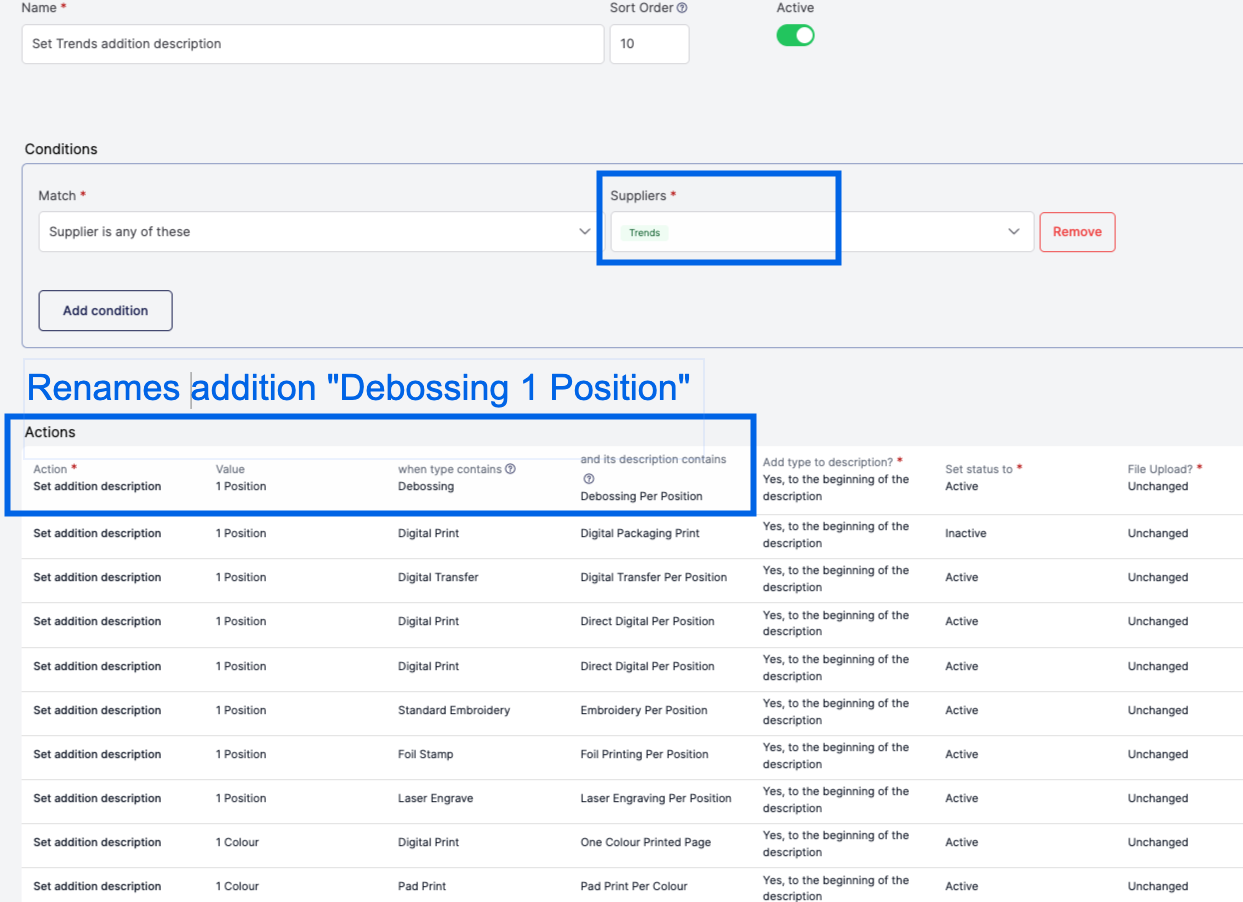
Your Xada App will have a number of ready-to-go option and addition description rules available that support the following suppliers:
- Trends
- Logo Line
- Promo
- Dex
- Nottage
- Promo Brands
- The Premier Collection
Each of these suppliers provide decoration information in slightly different formats. These rules help you quickly standardisation the options and addition descriptions across hundreds of products.
Example Addition Rule for Trends
Matching Decoration Types Reliably
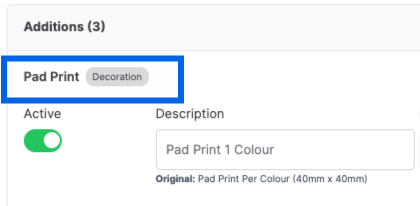
At the core of standardisation is the decoration type. These types are typically supplied via Promodata in a consistent and reliable format and act as the primary reference point for rules.
Common types include unbranded, screen print, digital print, pad print, laser engraving and embossing. Because the type is usually more consistent than free-text descriptions, it forms the foundation for most matching logic.
The type is located in the top left corner of the products option or addition
Using Type and Value to Standardise Descriptions
Rules use a combination of type and value to generate customer-facing descriptions. The type acts as the reference label, while the value is used to clarify how that decoration is applied.
For example, create the description "Pad Print 1 Colour 1 Position" replacing the supplier description entirely when it contains unwanted information.
Use the available "type" to add to the beginning or the end of the new description
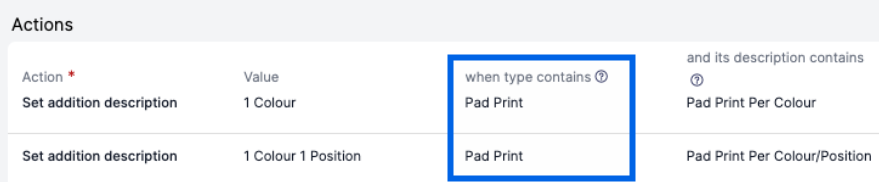
Add the "Value" to the option/description type e.g the original description contacts "Pad Print Per Colour/Position" use the value to insert your preferred description e.g. "1 Colour 1 Position"

Individual rule matches can also be activated or deactivated, allowing you to control exactly which options and additions appear on the storefront.
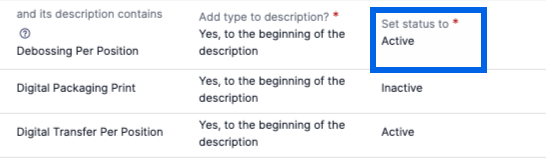
In practice, the available system rules typically cover around 85 percent of all supplier data, dramatically reducing the need for manual editing.
Copy the system rules and edit your saved version, allow you to adjust the description values to meet your naming requirements, plus create your own actions to pick up specific decorations to included in the system rules.
Preventing Unbranded Options from Appearing on the Storefront (Additions Required)
Base products are often unbranded and should not be purchasable without decoration. If you wish for some products to not be added to the cart unbranded, Xada supports this by allowing rules to mark additions as required.
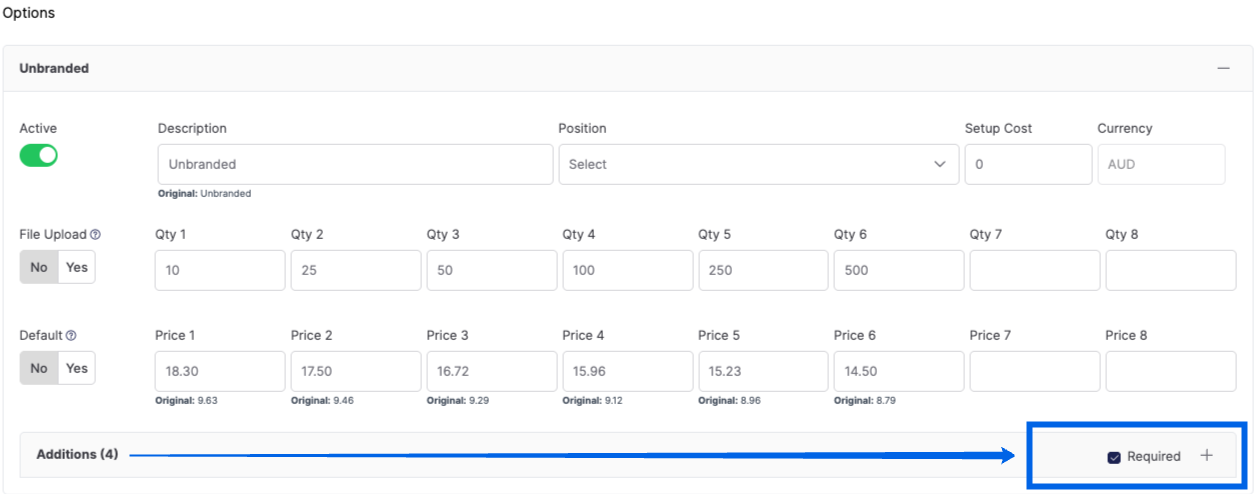
When additions are required, the base option pricing is never shown on its own. Instead, customers only see pricing that includes decoration. If multiple additions are active, the lowest priced addition is used to calculate the from price.
This approach prevents unbranded pricing from being exposed publicly, while still supporting accurate and competitive pricing displays.
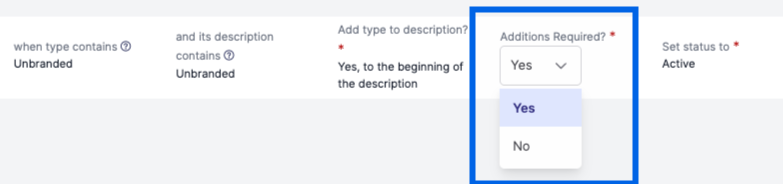
Example: Rule automatically checks the additions required action
Controlling Option Visibility and Complexity
Not every supplier-provided option should be shown on the storefront. Many suppliers include internal production variations such as stitch counts, personalisation surcharges, packaging options or sleeves that add unnecessary complexity for customers.
Rules allow you to deactivate these options while still retaining the underlying data for pricing and backend processes. The focus should always be on outcome-based options that customers can easily understand and choose from.
Simpler option sets reduce decision fatigue, improve usability and result in higher quality enquiries.
Renaming Decoration Types for Customer Clarity
Some supplier decoration names are overly technical or inconsistent across suppliers. Examples include 3D moulded, digital transfer or colour transfer per panel.
Rules allow these to be renamed using consistent logic across all suppliers. Lowercase types combined with sentence-case values are recommended, while all-uppercase descriptions should be avoided.
Standardised naming makes it easier for customers to compare products and understand their choices, regardless of supplier origin.
Setting Default Decoration Options
Rules can also be used to guide customers by setting a default decoration option. This is typically the most common or most cost-effective choice.
The default should align with the displayed from price and still allow customers to change their selection if required. Defaults reduce friction and speed up decision-making, especially for first-time buyers.
Defaults can be controlled via rules, theme logic or a combination of both, depending on your storefront configuration.
Supplier-Specific Considerations for Logo Line
Logo Line requires special handling due to legacy data structures. Historically, Logo Line supplied decorated products alongside unbranded products with additions, which can result in duplicate or conflicting options if both are enabled.
The recommended approach is to activate only the unbranded base product option and use additions to represent decoration methods. Supplier-provided decorated products should be ignored, with rules controlling which descriptions are applied.
This ensures consistency with Trends and other suppliers and prevents a cluttered storefront experience.
Long-Term Benefits of Rule-Based Standardisation
Once configured, rule-based standardisation delivers long-term value with minimal ongoing effort. A one-time setup applies across thousands of products, and new products automatically follow existing standards as they are imported.
Manual cleanup and maintenance are significantly reduced, customer experience improves and catalogues scale without adding administrative overhead. Consistent naming builds confidence, simplifies decision-making and supports stronger conversion outcomes as your range grows.