
Why does Xada show more products than I can see on my storefront?
Sometimes Xada may report a higher number of exported or published products than what is currently visible on your storefront.
For example:
- Xada says a supplier has 32 products
- But only 8 products are visible on the website
- Products exist in the store admin but not on the storefront
- Product URLs return a 404 page
- Products appear published in Xada but customers cannot access them
In most cases, this happens because the products are set to not visible.
Understanding “Active” vs “Visible”
A product can still:
- Be active in Xada
- Successfully export to store
- Have a valid product URL
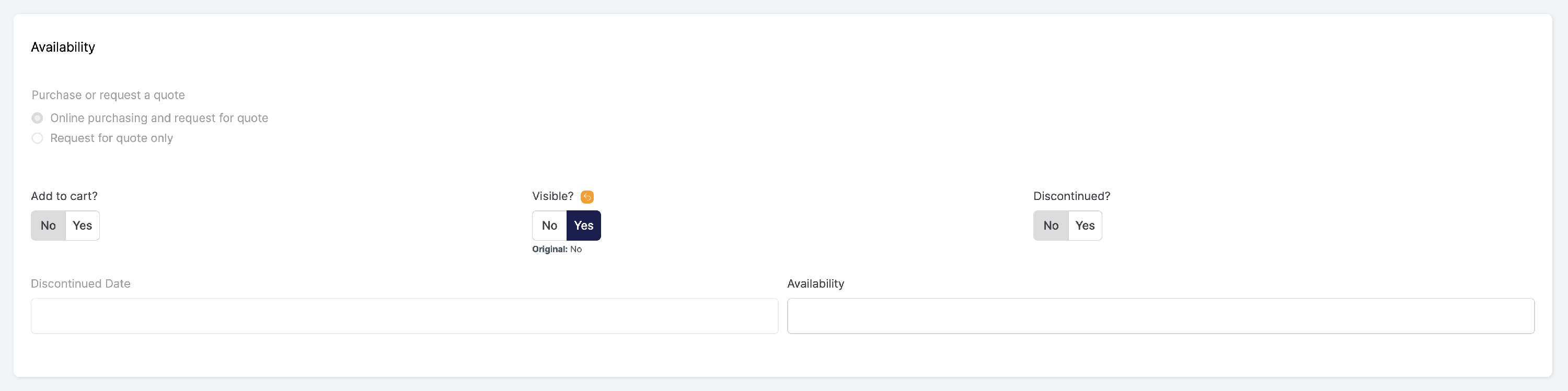
…but still not appear on the storefront if the “Visible?” setting is set to No.
When this happens:
- The product exists in the CMS admin
- Xada may still count it as exported
- Customers cannot view the product
- The storefront may return a 404 page
This commonly explains why product totals between Xada and the storefront do not match.
How to Check Product Visibility
To make a product visible on the storefront:
- Go to Products
- Open the product (Edit)
- Navigate to the Availability section
- Set “Visible?” to Yes
- Click Update & Publish
Once updated:
- The product will become visible on the storefront
- Customers will be able to access the product URL
- Storefront product counts may increase accordingly
Other Reasons Products May Not Appear on the Storefront
If the product is already visible, also check:
- Product is Active
- Supplier is Active
- Product has at least one active price
- Product belongs to an active category
- Product is not marked as Discontinued
- Product has completed a successful export
Common Symptoms Related to Visibility Issues
This article may help if you are seeing situations like:
- “Xada says products are published but I can’t find them”
- “Store product count is lower than Xada”
- “Product exists in admin but not storefront”
- “Why is product URL returning 404?”
- “Supplier has products in Xada but not on website”
- “Storefront products missing”
- “Export completed but products not visible”